
HELPING HANDS
HELPING COMMUNITIES CONNECT HAND IN HAND.
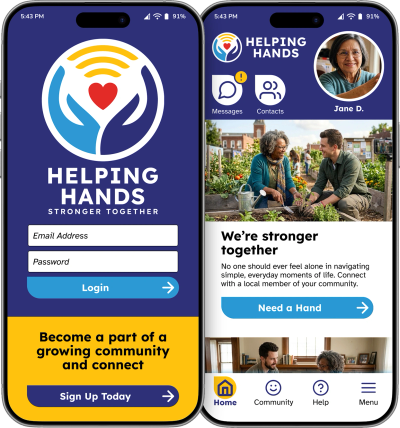
HELPING HANDS is a (fictional) web-based software platform that helps local communities connect together to give each other a hand. Bridge the gap between those who need a friendly boost and the compassionate neighbors eager to offer it. True community isn't built on grand, distant gestures—it lives in the quiet reliable acts of kindness: carrying a bag of groceries, fixing a porch light, sharing a warm conversation, or driving someone to a medical appointment.
THE PRODUCT: Design an app and a responsive website to for a service that helps connect elderly or at-risk people to local volunteers that can help assist with daily tasks. Allow local volunteers to sign up and offer their services to help anyone in their community.
UX COURSE PROJECT DURATION: 5 weeks; 2026
ROLE: Brand & Logo Design, Brand Identity, Web Design | Visual Design, UI | UX
BUSINESS GOAL: Design a product to help those in need and volunteers connect better equally.
Many of the groups rely on having technology to help them. Having a more reliable way for both user groups to connect together benefits everyone.
USER PROBLEM: Fragmented local communication, Lack of centralized aid, Hard to find local resources.
The need to connect quickly with reliable people in the neighborhood is unexpectedly challenging. Finding up-to-date, reliable information about local neighborhood resources and events is overly difficult. Building consistent, meaningful local connections is hindered by busy schedules and fragmented communication channels.
USER RESEARCH SUMMARY:
Using AI to develop a community of users, we were quickly able to generate a number of personas to start off with. Care Recipients addressed similar concerns on the difficulty to help to take care of a small task that would seem bothersome to ask a family member to travel far to accomplish.
Volunteer group found it difficult to find opportunities that don’t require to give up a large amount of time or a large amount of paper work. Often a willing volunteer ends up abandoning their will to complete the process.

Understanding two sets of users groups & building to connect them both
Not only understanding the normal user pain points, but also understanding a full other group of users both with similar but different goals that must meet both needs.

From insight to interface
Direct, simple & to-the-point layouts for both user groups to get to their end goal. Prioritized the least amount form filling lists for each posting the user groups do.
Designing the structure
Explored a low-fidelity prototype from the user flow diagram & wire frames to validate structure, hierarchy and functionality.

Creating the Brand & Identity
Helping Hands color brand palette is "Cheerful Connections". Colors represent a "cheerful and energetic" standard while maintaining the strict WCAG AAA contrast ratio. Using brighter, more saturated warm tones against an extremely deep contrast color (instead of black) on a white clean background conveys the "cheerfulness" without reducing contrast or professionalism.
TYPOGRAPHY & FONTS:
Lexend and Atkinson Hyperlegible fonts set a friendly and ultra-accessible standard. This combination balances maximum readability with a warm, human touch. Fonts were chosen specifically to reduce visual stress and improve reading speed. Its rounded, open letter forms look cheerful and welcoming without looking child-like. Designed specifically for low-vision readers. Every character shape is distinctive to prevent confusion.
Implemented a text hierarchy throughout the design and color breaks. This helps users to distinguish the different sections and information on screen.
Designing elements for consistency & scale
Design system built to make sure that designs are consistent, scale easily and faster. Designs that would be easy to adapt with changes.
Refining the Design
Based on insights from the usability studies and AI feedback, applying design changes such as adding additional editing options and adding more navigation options.
Developing the Product
Create a cross-platform responsive design. Build the same experience for all users, no matter what type of device they choose to use.

Takeaway
IMPACT:
The design strategy included an efficient concept design that increases task efficiency multifold, and improves engagement with the application and build out.
WHAT I LEARNED:
While designing this app and website, I learned that the first round of ideas for the project are always changing are only the beginning of the process. Usability studies and peer feedback influenced each iteration of the app’s design. Using AI as an additional source can help fill in gaps of missing information that may have been missed prior is a valuable assets for refining the product more.
Any thoughts and insights on this topic is greatly appreciate. All feedback is essential to further enhancing my skills and findings of this study.